EPOS Systems Explained: What UK Small Businesses Need to Know
What an EPOS system is, what it does for a small UK shop, the hardware it needs, what it costs to run, cloud vs traditional, and how to choose one.
 The Fluent team11 min read
In questa pagina
An EPOS system (electronic point of sale) is the software and hardware a shop uses to take payments and record each sale. Unlike a basic cash register, which only adds up totals, an EPOS system records what was sold, by whom and how it was paid, and updates stock, staff and takings together.
Key takeaways
- An EPOS system is the till plus the records behind it: each sale updates your stock, your team's figures and the day's takings in one place.
- EPOS and POS mean almost the same thing. Judge a system by what it connects, not by its name or how the till looks.
- The kit is simple: a screen and a card machine, plus a receipt printer, barcode scanner or cash drawer if you need them.
- The running cost is software, card fees, hardware and setup time. Add them up per month before you compare systems.
- Cloud EPOS lets you check the shop from anywhere, but it needs a reliable internet connection, so plan a backup.
What is an EPOS system?
An EPOS system is the till of a modern shop: point-of-sale software on a screen, connected to a card machine and to the records behind the counter. EPOS stands for electronic point of sale. The point of sale is where, and when, a customer pays.
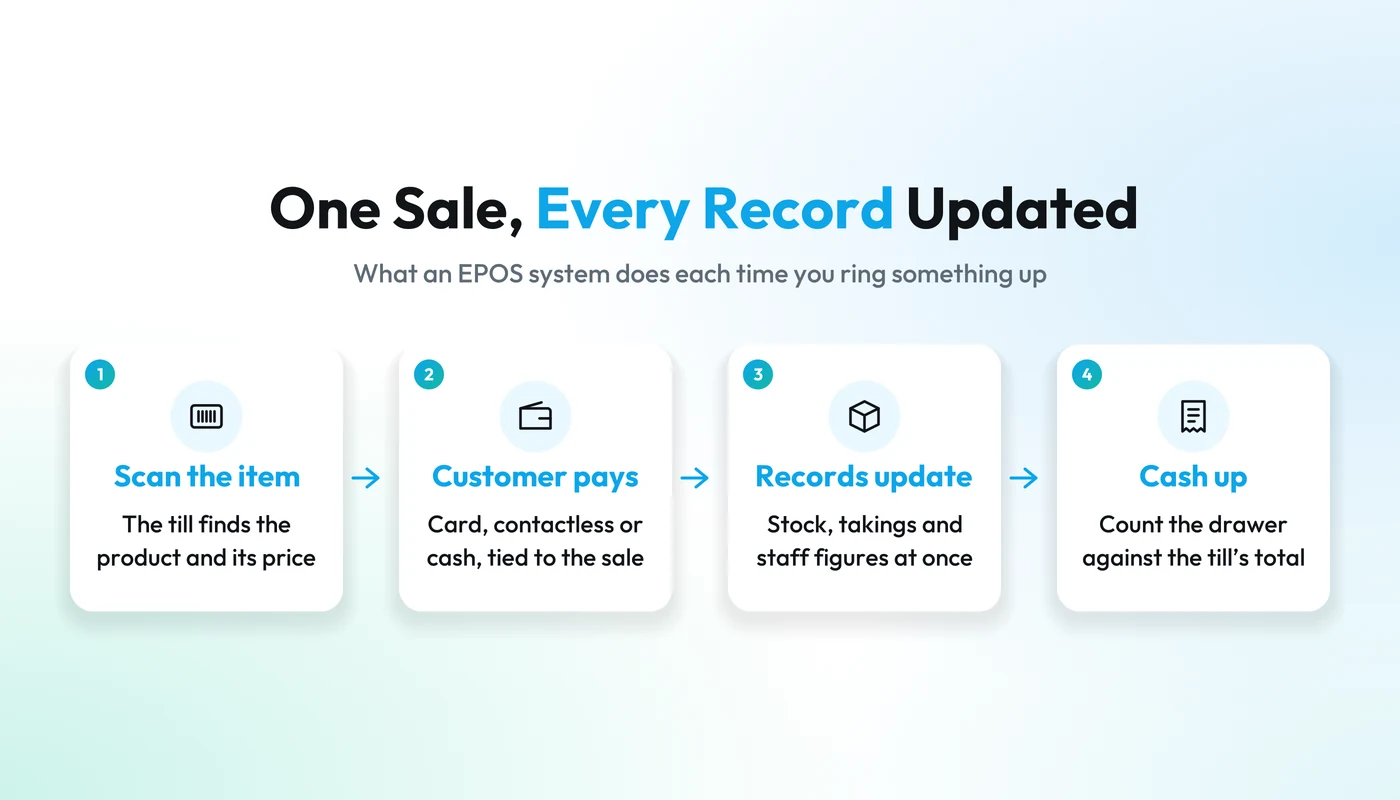
The difference from an old cash register is the detail. A cash register adds up prices, holds the cash and prints a total at closing. It knows how much you took, but not what you sold.
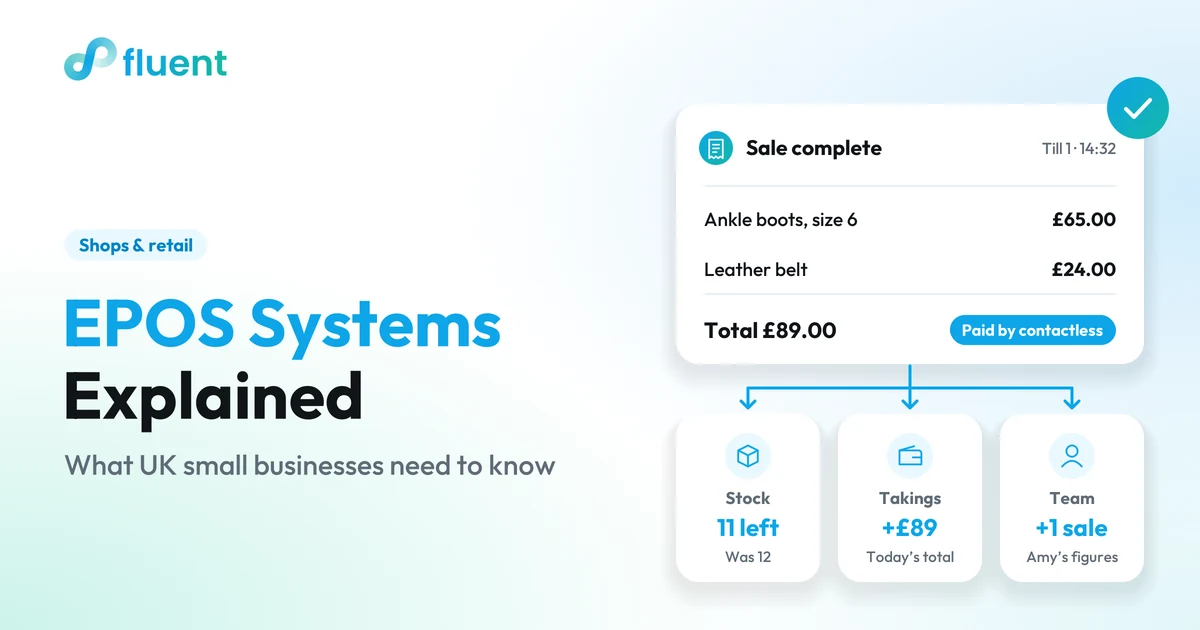
An EPOS system works item by item. Every product sits in a catalogue with its price, size and colour, so the till records a pair of black ankle boots in a size 6, sold by Amy, paid by contactless. From that one sale, everything behind the counter updates at once:
- the stock count for that line drops by one
- the day's takings go up, split by card and cash
- the sale counts towards Amy's figures
- a regular's purchase history gains a line
That is the whole idea: the till plus the records behind it. The screen is the part you see; the value is in what each sale updates.
What does an EPOS system do for a small shop?
It takes payments and keeps the shop's records up to date while you trade, so you are not rebuilding the day from till rolls, card slips and a stock spreadsheet after closing. For a small team, that means time back and fewer surprises on the shelf.
The main jobs:
- Takes payment. Card, contactless and cash, each payment tied to its sale.
- Keeps stock in step. Each sale comes off the count, so you see what is running low before the shelf is empty.
- Adds up the takings. The day's total, split by payment method, ready for cashing up.
- Records who sold what. Each sale is linked to the person who made it.
- Remembers customers. Purchase history and, on many systems, loyalty rewards and gift cards.
- Reports on the shop. Best-sellers, slow lines, busiest hours and a VAT summary.
Picture an illustrative Saturday in a small shoe shop. Without EPOS, closing up means counting the cash, printing the card machine's report, checking both against the till roll and crossing sold lines off a stock sheet. With EPOS, the takings and stock figures are already there, and cashing up is counting the drawer against what the till expects.
Good records matter at tax time too. As of October 2026, GOV.UK's guidance for sole traders lists till rolls among the records that show your sales (opens in a new tab), and VAT-registered businesses must, unless exempt, keep digital records and file VAT Returns through compatible software under Making Tax Digital for VAT (opens in a new tab). An EPOS system does not make you compliant on its own, but it gives you a clean, item-by-item sales record to start from. Ask your accountant what they need from it. This is general information, not tax advice.
To see these jobs working together in one system, our page on Fluent's EPOS system for UK small businesses walks through each one.
EPOS vs POS: is there a difference?
Not much, today. POS (point of sale) is the general term for wherever and however a business takes payment. EPOS is the electronic version: till software, a card machine and the records behind them. UK shops tend to say EPOS; in the US, POS system is the usual term. Both describe the same kind of product.
The "E" mattered when shops were swapping mechanical cash registers for computerised tills. Now almost every till is electronic, so the words have merged. You will also hear "PDQ machine" or "card terminal" for the card machine.
| Term | What it usually means | Where you'll hear it |
|---|---|---|
| POS | The point where a customer pays, and the system used there | Everywhere, especially the US |
| EPOS | An electronic POS system: till software, card machine and records | Mostly the UK and Ireland |
| EPOS till | The screen and software at the counter | UK shops and suppliers |
| Cash register | A till that adds up sales and holds cash, with few records | Older or very simple setups |
So do not choose on the label. Some products sold as POS do more than some sold as EPOS. What counts is what each sale updates.
What hardware does an EPOS system need?
Less than it used to. Most small shops need a screen to run the till and a card machine. A receipt printer, barcode scanner and cash drawer are extras, depending on how you trade. Many modern systems run in a web browser, so the screen can be a tablet, laptop or phone you already own.
| Hardware | What it does | Do you need it? |
|---|---|---|
| Screen: tablet, laptop or phone | Runs the till software | Yes |
| Card machine | Takes card and contactless payments | Yes, if you take cards |
| Receipt printer | Prints paper receipts | Often |
| Barcode scanner | Brings up the right product and price in one scan | If many of your lines have barcodes |
| Cash drawer | Holds notes and coins at the counter | If you take cash |
| Internet connection | Keeps a cloud system running | Yes for cloud EPOS, with a backup |
Ask two questions before you buy anything. Does the system run on kit you already own, or only on its own terminals? And which card machines does it work with? Running in the browser on your existing laptop costs less to start than a dedicated terminal on every counter.
Do not buy hardware first and hope it fits. List what you have and ask the provider to confirm each device, model by model.
How much does an EPOS system cost to run?
The cost to run an EPOS system is the sum of several parts: the software, card processing fees, the hardware and the time it takes to set up. Compare monthly totals rather than headline software prices, because card fees grow with your takings and can end up the biggest line.
| Cost | How it is usually charged | What to ask |
|---|---|---|
| Software | A monthly subscription, sometimes per till, user or location | What is included, and what costs extra? |
| Card processing | A percentage of each card payment, sometimes plus a fixed fee | What is the rate for contactless, chip and PIN, and payment links? |
| Hardware | Bought upfront or rented monthly | Can I use kit I already own? |
| Setup | Your time to add products and train staff | Can I import my product list from a spreadsheet? |
| Contract | A minimum term, notice period or exit fee | Can I leave, and take my data with me? |
Here is an illustrative example, with invented round numbers, to show the arithmetic. It is not a quote and not any provider's price. A small gift shop takes £8,000 a month on cards.
- Software: £40 a month.
- Card fees at an illustrative rate of 1.5%: £120 a month.
- A card machine bought for £120 and used for two years: £5 a month.
- A receipt printer and scanner bought for £180 and used for three years: £5 a month.
That comes to £170 a month, and card fees are well over half of it. If card takings double, so do the card fees, while the software stays the same. A small difference in card rate can matter more than a big difference in software price. Count setup time too: evenings spent adding products are a real cost.
Do the same sum with your own figures for each system you shortlist.
Cloud EPOS or traditional EPOS?
For most small shops today, cloud EPOS is the simpler choice, as long as the shop has a reliable internet connection. Cloud EPOS keeps your records online, so you can check sales and stock from home and updates arrive without an engineer. Traditional EPOS keeps the software and records on a computer in the shop.
| Cloud EPOS | Traditional EPOS | |
|---|---|---|
| Where records live | Online, on any device you sign in on | On a computer in the shop |
| Checking from home | Yes, from a phone or laptop | Usually only at the shop |
| Updates | Automatic | Installed by you or an engineer |
| Upfront cost | Usually lower, with a monthly fee | Often a licence and kit upfront |
| Without internet | Some offer an offline mode; many need a connection to trade | The till keeps running, though card payments usually still need a connection |
The honest catch with cloud EPOS is the connection. If your broadband drops on a busy Saturday and the system has no offline mode, you cannot ring up sales until it is back. Ask every provider directly: does it work offline, and what happens to a sale in progress if the connection drops?
A backup costs little: a mobile hotspot on a phone, kept charged, can keep a cloud till trading while the broadband is down.
Practical tip
Test your backup before you need it. On a quiet morning, switch the till to your phone's hotspot, ring up a test sale and refund it. Better to find out on a Tuesday than on a Saturday.
How do you choose an EPOS system?
Start from how your shop trades, not from a feature list. For a small UK shop the choice comes down to what the system connects, not how the till looks: every sale should update stock, takings and staff figures without anyone copying numbers between apps.
Use this checklist when you compare systems:
| Check | Why it matters | Ask in the demo |
|---|---|---|
| What one sale updates | Copying between tools costs time and causes mistakes | When I ring up a sale, what changes automatically? |
| Your busiest hour | The till has to keep up with a queue | Can I see it handle a busy Saturday? |
| Card payments | Fees and card machines vary | Which card machines work, and who processes payments? |
| Kit you already own | Saves money on day one | Will it run on my tablet or laptop? |
| Stock and products | Sizes, colours and barcodes need to fit | Can products have variants, and can I import my list? |
| Internet connection | Cloud systems need one | What happens if the broadband drops? |
| Takings and VAT | Cashing up and the books | Can I see takings by payment method and a VAT summary? |
| Your accountant | They need your figures in a usable form | How will my sales figures reach my accountant? |
Then shortlist two or three systems, book a demo with each, and watch each one ring up a sale from start to finish.
If you are also weighing one connected system against several separate apps, our guide to all-in-one business software vs point solutions covers that trade-off.
Where does Fluent fit?
Fluent is one system to run a local business, and Fluent Retail is its version for clothing and shoe shops, pharmacies and independent shops. The counter, products, stock, customers and an online store sit in one place, so a sale at the till updates stock and the day's takings together. Fluent is sold in the UK today.
Against the checklist:
- Runs on what you have. Fluent is a web app, so the till runs in the browser on a tablet, laptop or phone you already own.
- Standard kit. Fluent is designed to work with the standard hardware on the market: card machines, receipt printers, barcode scanners and cash drawers. Card payments run through payment partners such as SumUp. We confirm your exact hardware in a demo.
- Stock that keeps up. Products can have variants such as sizes and colours, and you can import a price list from a spreadsheet. Fluent flags lines set to sell out within about a week, and lines with no sales in 30 days or more.
- Your team. Each sale and each tip is recorded against the team member who took it. Shifts plans the rota and syncs to Google Calendar.
- Your customers. Purchase history, loyalty rewards, gift cards and Email & SMS follow-ups for customers who have agreed to hear from you.
- Questions in plain words. Ask Fluent AI "What were today's takings, by card and cash?" or "What's about to sell out?" It answers from your own figures, and nothing is sent or changed until you confirm.
One honest limit: Fluent needs an internet connection and has no offline mode, so keep a mobile hotspot ready. For the books, Fluent has its own invoicing and a VAT summary for any period; in the demo, ask how best to pass your figures to your accountant.
For a closer look, see the EPOS system for UK shops page. Prices are on the Fluent pricing page, in your currency. Or book a 15-minute demo by WhatsApp, phone call or Google Meet and see Fluent on your own screen.

FLUENT RETAIL
See one sale update your stock and takings: book a 15-minute demo
Riunisci banco, prodotti, scorte e clienti. Dedica più tempo ad aiutare le persone a trovare ciò che cercano, con l'attività sotto controllo.
Frequently asked questions
What is the difference between an EPOS system and a card machine?
A card machine takes card and contactless payments and tells you how much went through it. An EPOS system records the whole sale: which items, which team member, which payment method, and what that does to your stock and takings. Many shops use both, with the card machine connected to the EPOS system so each payment matches its sale.
Is an EPOS system worth it for a very small shop?
Often, yes, once you sell more than a handful of lines or anyone else works the till. The best EPOS system for small business owners is the one that ends the evening job of matching card slips, cash and a stock sheet. If you sell a few things a week, a card machine alone may do for now.
Does an EPOS system help with VAT?
It can. A good EPOS system records the VAT on each sale and gives you a summary for any period, which makes your VAT Return quicker to prepare. It does not make you compliant by itself. Your accountant can tell you how your EPOS figures should reach the software you use for Making Tax Digital.
How long does it take to switch to a new EPOS system?
It depends mostly on how many products you sell and whether you can import them from a spreadsheet. Plan the move for a quiet week, not your busiest season. Set up products and kit first, train the team on a slow morning, and test a few sales before you open.